
Adding Sources
Your agent can only answer questions from content it has indexed. This guide covers every way to add content.
Website pages
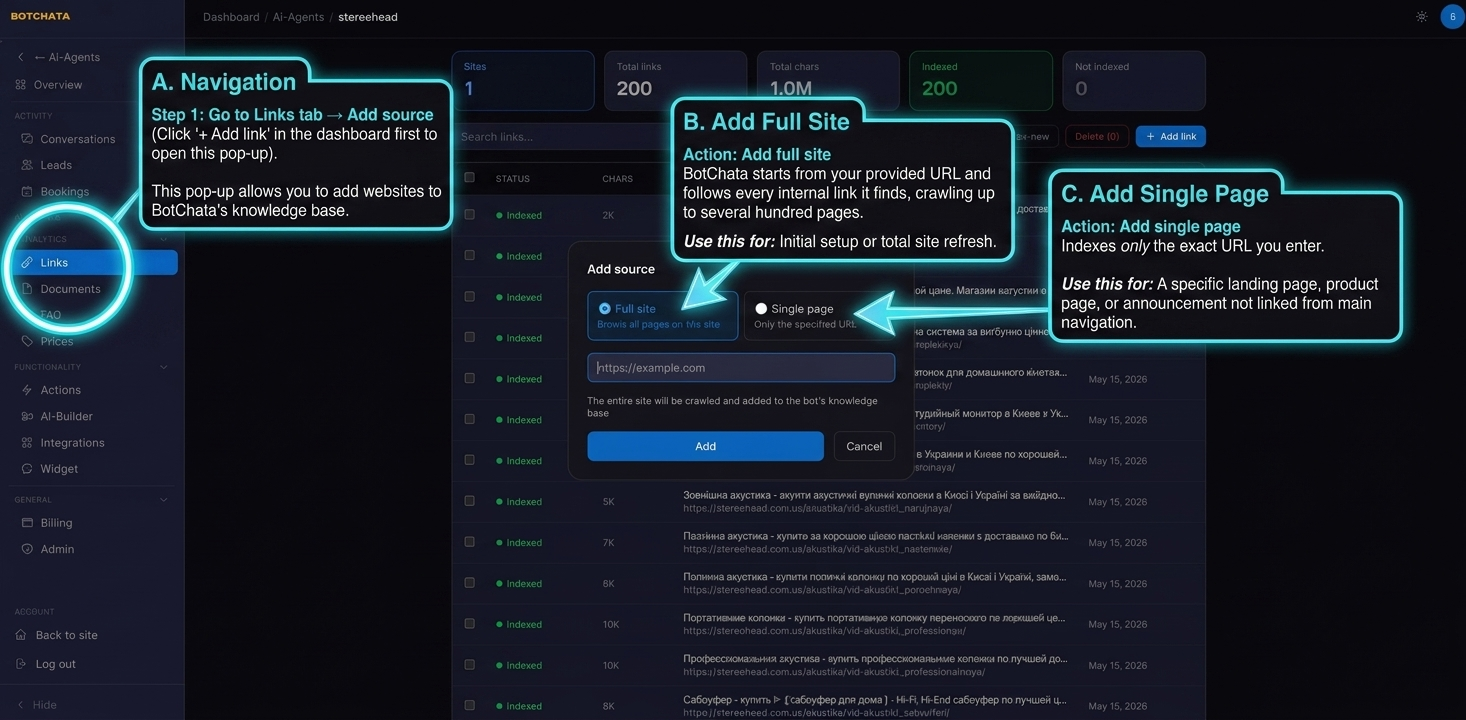
Go to Links tab → Add source.
Add full site — BotChata starts from the URL you provide and follows every internal link it finds. Use this for the initial setup or to refresh your entire site.
Add single page — Indexes only the exact URL you enter. Use this for a specific landing page, product page, or announcement that isn't linked from your main navigation.
Managing indexed pages
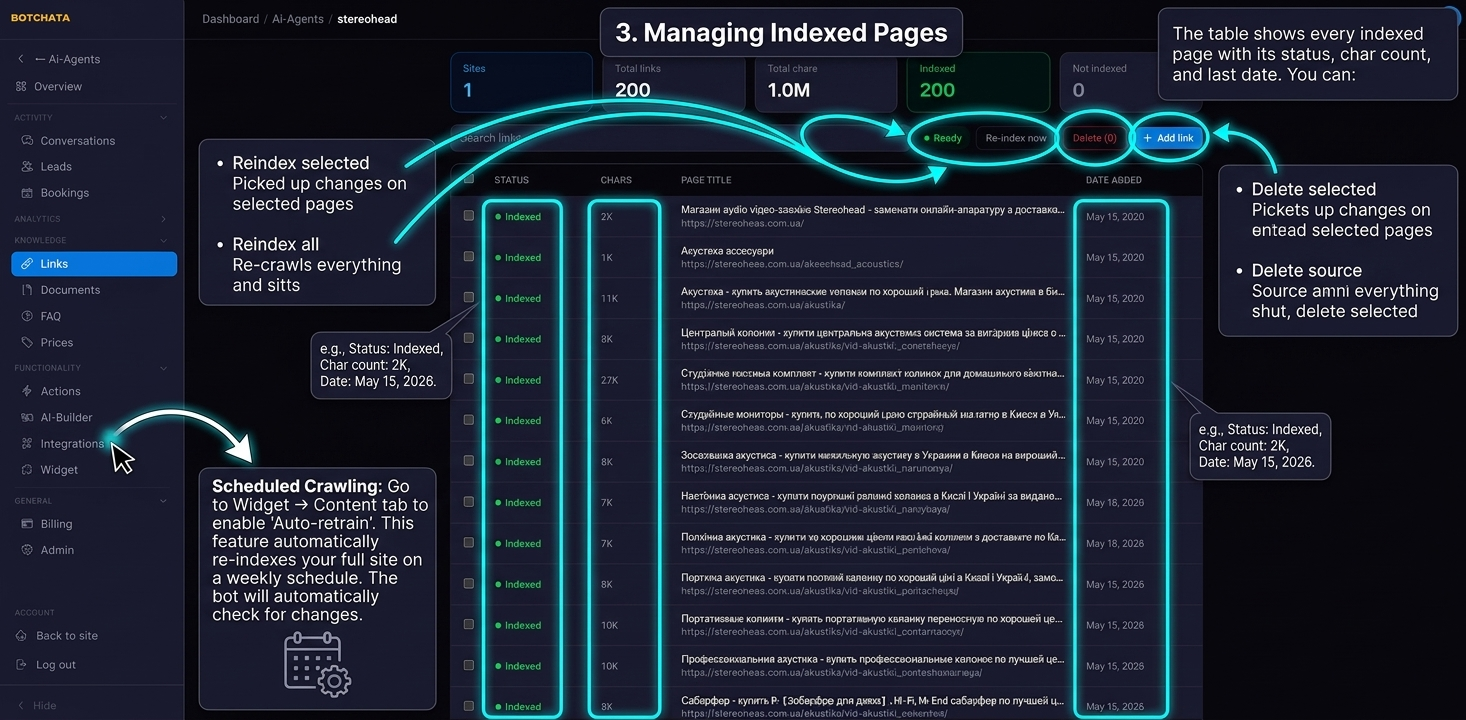
The table in the Links tab shows every page the crawler visited with its status, character count, and last indexed date. Indexed pages show green; pages that were visited but produced no usable content show red. You can:
- Reindex selected — re-crawl specific pages to pick up recent changes.
- Reindex all — re-crawl everything (equivalent to a fresh full-site crawl).
- Delete selected — remove pages from the knowledge base.
- Delete source — remove all pages from a domain at once.
While a crawl runs, the status shows a live page count and an estimated time range. Larger sites take longer — crawl ceilings depend on your plan (see Plans & Billing).
Auto-retrain re-indexes your full site on a weekly schedule automatically (Business plan and above).
Crawl filters (include / exclude paths)
E-commerce and multilingual sites often generate thousands of near-duplicate URLs from filters, sorting, and pagination. The Crawl filters panel (in the Links tab) keeps that noise out of your index:
- Automatic filtering (on by default) — skips pages with a
noindextag, non-self canonical URLs, and common facet/sort/pagination query parameters (sort,page,filter, …). - Skip filter combinations (on by default) — skips URLs whose path looks like a stack of filters (the main source of URL explosion).
- Exclude paths — your own list of path patterns to skip (glob or substring, one per line), e.g.
*/cart,/blog/tag/. - Include paths — restrict the crawl to matching paths only.
Tip for a multilingual store: include only your primary language (e.g.
/en/) and exclude filter paths to keep the index lean and on-topic.
Documents
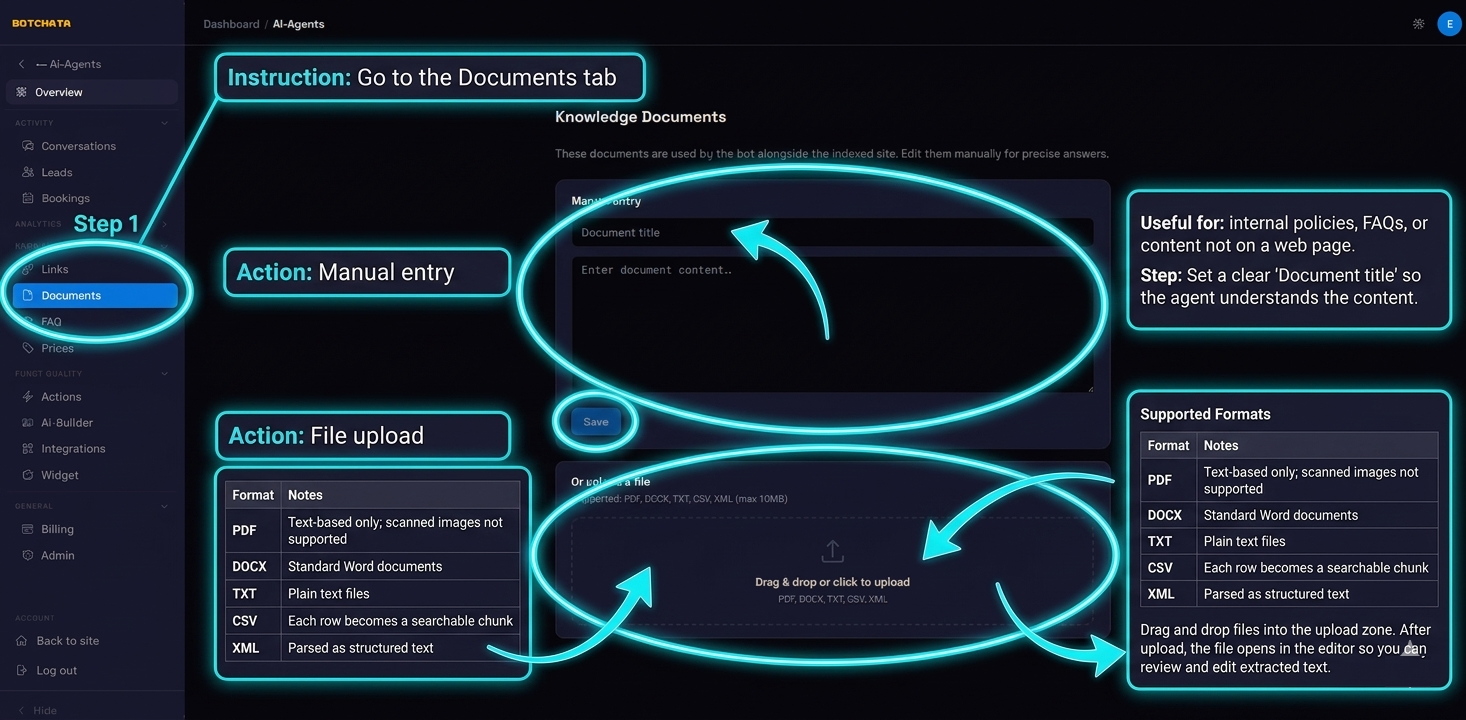
Go to the Documents tab. Add content two ways:
Manual entry — Type or paste text directly. Useful for internal policies, FAQs, or content that isn't a web page. Set a clear title — the agent uses it to understand what the document is about.
File upload — Drag and drop files into the upload zone:
| Format | Notes |
|---|---|
| Text-based PDFs only; scanned images are not supported | |
| DOCX | Standard Word documents |
| TXT | Plain text files |
| CSV | Each row becomes a searchable chunk |
| XML | Parsed as structured text |
After upload, the file opens in the editor so you can review and edit the extracted text before saving.
FAQ
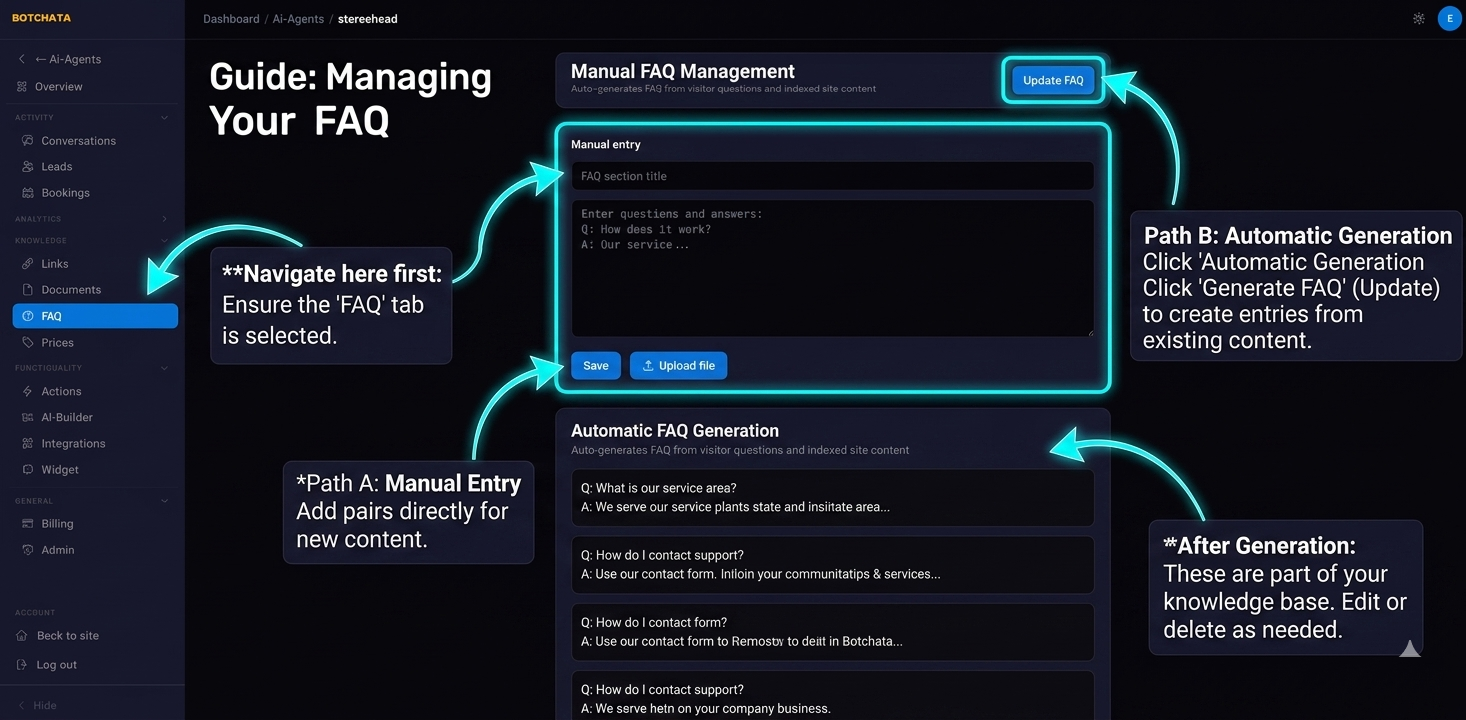
Go to the FAQ tab. Add question-and-answer pairs manually, or click Generate FAQ to have BotChata create FAQ entries from your already-indexed content (optionally for conversations from the last N days). Generated entries become part of the knowledge base — edit or delete them at any time.
Prices
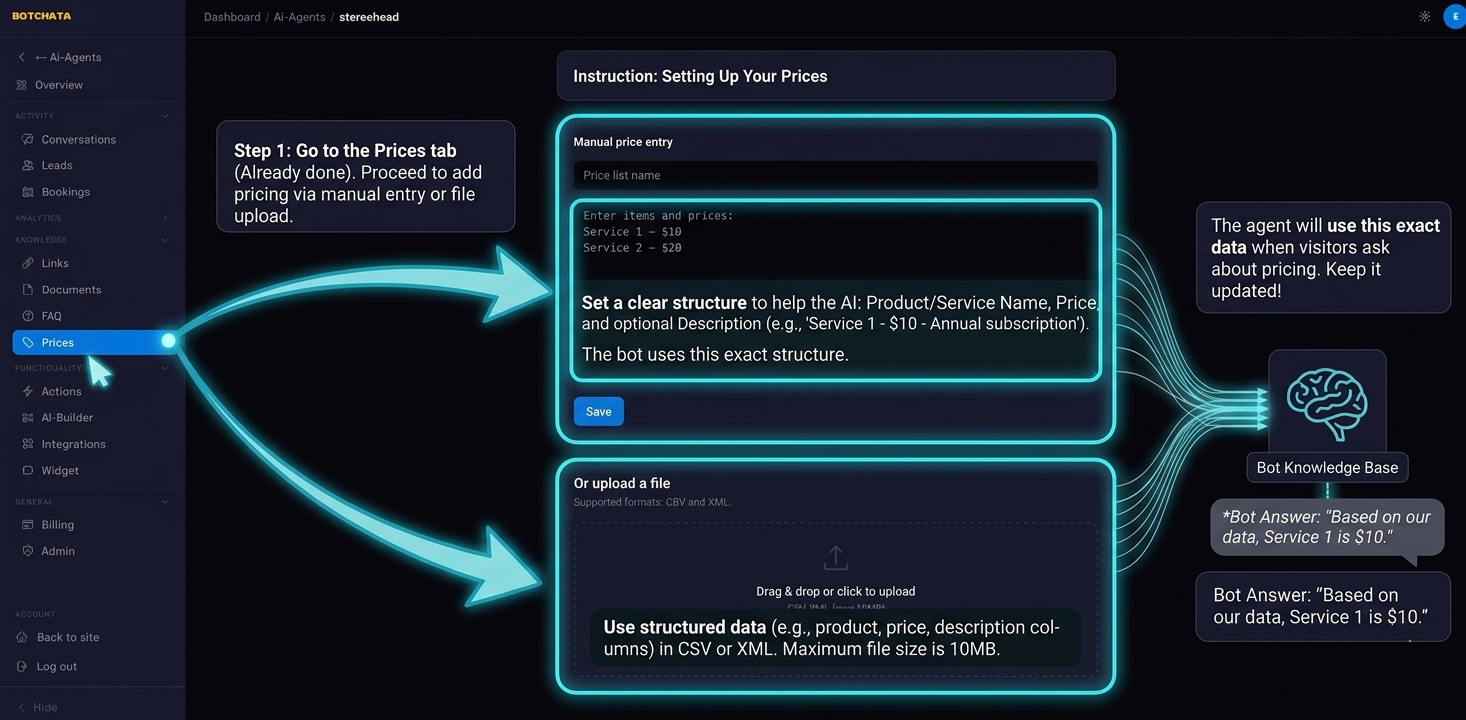
Go to the Prices tab. Add prices as single entries (name + price + description) or as a price grid (a rows × columns matrix — e.g. quantities × variants). You can also import a CSV/XLSX/ODS file. The agent answers price questions from these entries first, so it never invents a price.
Tips for better answers
- Be specific in document titles. "Return Policy – EU Customers" beats "Policy doc".
- Remove duplicate content. If the same information appears on many pages, index only the canonical version (and let crawl filters drop the rest).
- Use FAQ for common questions. Explicit Q&A pairs improve accuracy for predictable questions.
- Keep content current. Re-index pages after significant updates, or enable Auto-retrain for sites that change often.